Posts

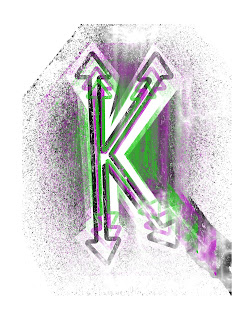
Self Logo/Tag Brush- Photoshop
Image
      I really liked working on this in class and getting to learn the ins and outs of Photoshop together. I was a little nervous going into class because I've never had the opportunity to work in this specific program, so I had a little fear of quickly falling behind. Once we began, right off the bat I knew that I was going to love using Photoshop.       It's a neat idea to be able to use past work that was created in a different program. I never would've thought to add on to my logo, but thanks to Photoshop I was able to.  When working on this project I added my original logo (bottom art) into Photoshop and then continued to add layers and play with the opacity of different scratches, negatives, etc. Wrapping the project up, I was able to create the final tag (top art.)  I was excited to hear that from now on, on all of our future artwork we will be applying the tag to the corner. This is a really neat idea and will make all of the art even...

Photoshop Basics

 Photoshop Tutorial for Beginners 2021 / Everything you NEED to KNOW! https://www.youtube.com/watch?v=61mkx_OV61s      I've never used photoshop ever in my life, so I wanted to start with a youtube video that introduced the basic information and tecneques. The tutorial started with how to select a new document to work on and how to set the name, resolution, orientation, color mode, and a lot more. He then added how to import an image; simply all you need to do is drag and drop the image onto the canvas. The last thing I really liked that he mentioned in the tutorial was the location of the tools. Like many other programs we've used in this class, the toolbar is to the left. I learned that if there are any tools that you want to use that aren't available, all you have to do to get them is go to the window tab at the very top.  Learn Photoshop in 5 MINUTES! Beginner Tutorial https://www.youtube.com/watch?v=KAmSB5MQxOo     I decided to follow along with t...

Propaganda Poster

Image
     This is my propaganda poster, "TAKE IN THE GOOD." This project was special to me because that's my life motto and I think about it whether it's the best or worst day. I thought it went really good with my portrait because you can see my confident attitude through my facial expression. I believe to live by this motto it's really important to have a confident and spunky attitude.      My favorite part of the poster is the colors I used. As I've mentioned in multiple of my projects, blue and green are my favorite colors. Not only that but they pop well together in which is important in a propaganda poster. I had fun making this and having the ability to advertise my life motto through art. It really shows that a lot can come from a simple selfie and motto.      The first thing I did when starting this project was placed my portrait on the canvas. I then used the pen tool to trace over the different body parts while using different layers. I...

Self Logo- Illustrator

Image
     I honestly never took a step back and thought about what my self logo would be before this project was assigned. Overall, I would say that I'm a very simple person and this was very important for me to showcase through my own logo. If I were to quickly describe my logo I would explain that it's a K in which symbolizes my first initial with four arrows at each endpoint. The arrows indicate the four states I have lived in; Missouri, Arkansas, Hawaii, and Ohio. I also incorporated green and blue in the top two for two different reasons. Reason one, I wanted the logo to represent the landmarks I've lived and my love for traveling the world/globe. Reason two, keeping it simple green and blue have been my favorite colors for as long as I can remember. I wanted to add a brown fill in the bottom left logo to allow the logo to be color blindless friendly. I think these two colors together are very bold and fit perfect together in the color chart. The last logo, black and whit...

Calligram Project

Image
  Estimated time- 4 hours      Attached is an image of my calligram project. I enjoyed this project a lot more than the last one simply because I can see myself using this specific software in the future. I also found myself enjoying the process of this project more because the letter I ended up writing to myself really hit home. I decided to keep the project simple and have my letter in the shape of a heart because, at the end of the day past, present, or future my main goal is to live life with a full heart. As you can see in the image, the heart starts with dark reds, and as the letter goes on ends in very light pinks. I did this on purpose because I wanted the reds to signify hardships and the pinks to signify the light at the end of the tunnel. With every negative comes and positive and I wanted that to be the main takeaway from the letter to my future self.      I started this project off by creating a pill-shaped heart, I've found that there are...

Illustrator Basics

Youtube Videos: https://www.youtube.com/watch?v=dyzBZizFruU Adobe Illustrator Beginner Tutorial: Create a Vector Peach from Sketch (HD) I found the creator of this channel to be helpful because he focuses on the creation of logos, icons, and illustrations in Adobe Illustrator; this happens to be the projects ill be focusing on in my specific career. The channel mentioned that for beginners it's very important to create a sketch that's very similar to what you want your outcome to resemble so you're able to have something to refer to thoughout6 the project. The first step in his tutorial was to make sure you have outlines, he used the pen tool to do so. He then explained that it's important to close the shapes off, so you can use the shape builder tool to make less work for yourself in the long run of the project. This YouTube video was very informative to me because I now understand the basics and what it takes to create the perfect project in Illustrator.  https://www....

Cubism Portrait of Myself- Kevalyn Boettner

Image
       Personally, for me, this project was very difficult and took me around 12 hours to complete. I sat at my computer for hours each night trying to find the perfect codes for the colors and shapes that best fit my piece of art. As you can see my final project is a bit different than my sketch, thus shows how I began to feel more content using the program through the many hours. I decided that for this project I wanted to make cubism art because this is something I have never had the opportunity to do, thus I ran with the idea and created a cubism portrait of myself.  I made sure to include many different techniques that I've learned using Adobe Dreamweaver in which included; bezier and quadratic curves, lines, triangles, circles, and rectangles.      There are a few reasons that make this piece so successful, but particularly the reason that it stands out to me is that I was able to complete something I would've never thought I could ever do. ...